What it does
Instant switch
F1 and F2 walk your rotation, F3 jumps straight back to your leader. One key, no mouse, no Mission Control.
Exact active client
Rotation follows the exact Dofus window you are using, even when macOS reports several game clients as frontmost.
Mac and Windows VM together
Run one Dofus client on your Mac and another in VMware Fusion. The VM joins the same F1 and F2 rotation, wheel and direct keys. Multi-Tofu stays on the Mac, with nothing to install inside Windows.
Character wheel or party panel
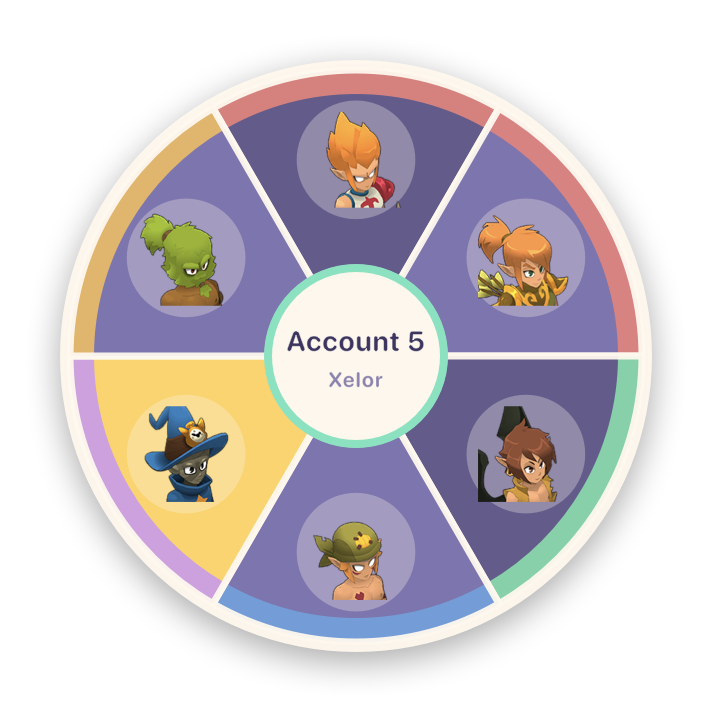
Hold your key and pick a client to bring forward. Choose the look in Settings: a radial wheel under your cursor, or a party panel pinned to the left that reads like the Dofus group frame, with a crown on your leader and a key on each character.
Teams
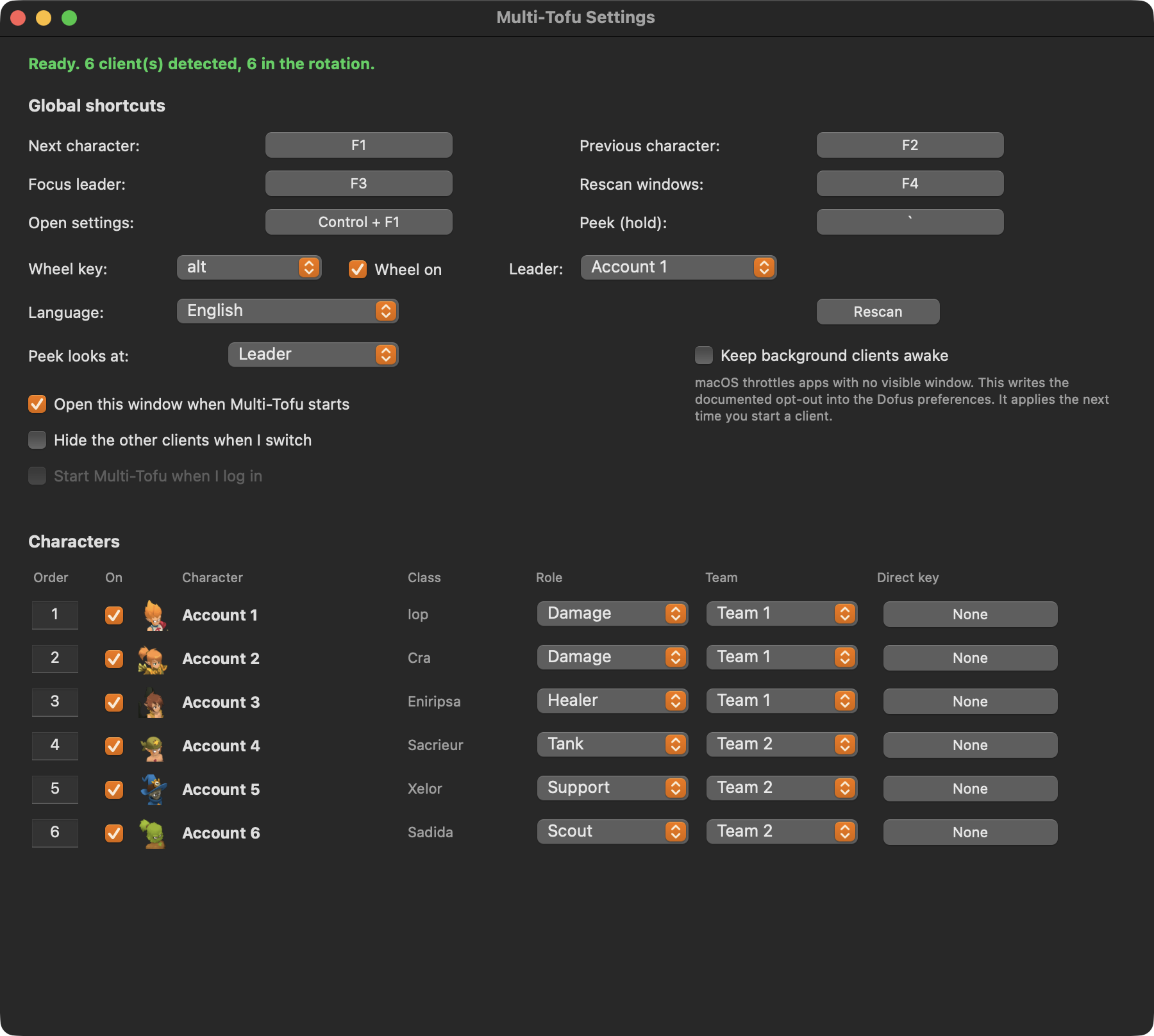
Split your characters into teams and cycle only inside the active one. Useful when you run a dungeon group and leave the rest parked.
Direct keys
Bind one fixed key per character. F5 always goes to your Iop, whatever the rotation is doing.
Real names
Character names are read live from the game window. Nothing to type in, nothing to keep updated.
Four languages
English, French, Spanish and Portuguese, following your system language.
Roles
Tag each character as tank, healer, damage, support or scout and its wheel segment gets a coloured rim. Past five clients you read colour faster than names.
Peek
Hold one key to look at another client, release and you are back where you were, rotation position intact.
Order by number
Type a position to place a character. Sorting a team by initiative is six keystrokes, not twenty arrow clicks.
It stays saved
Order, teams, roles, leader and every shortcut are written to disk as you change them, keyed by character. Come back next week and it is as you left it.
Stays out of the way
It opens Settings the first time so you can set it up, then sits quietly in the menu bar. Once it is running it does not keep coming back to the front, even when the Ankama Launcher relaunches it.
One key, one action
Assigning a key that another shortcut holds frees it there. Two actions on one key means one of them silently never fires.
There when you are
Start it at login in one click, so it is already running when you open the Ankama Launcher. Idle it costs nothing, with no client open it never even asks the system about windows.
Only the client you are on
Switch on hiding and every other client disappears while you play the one in front. Nothing peeks around the edges, Command Tab stays readable, and they all come back the moment you switch to them.
It learns your characters by itself
You never type a character name. Multi-Tofu reads the Dofus window title, so the moment a character logs in their real name appears in the wheel, in the menu bar and in the settings list. A client that is open but still sitting on the login screen has no character on it yet, so it shows as Account 1, Account 2 and so on. Those stay clickable in the menu, so you can jump to one and log it in, but they are kept out of the F1 rotation. A keypress never lands you on a window with no character on it.
Install in about a minute
Download and unzip
Grab the zip from the releases page and drag Multi-Tofu into your Applications folder.
Right click, Open
The app is not signed with a paid Apple developer account, so the first launch needs a right click then Open. After that it opens normally.
Allow Accessibility
macOS asks once. Multi-Tofu needs it to read window titles and to hear your shortcuts. Switch it on and the shortcuts come alive a couple of seconds later, no restart.
Updating later
An app signed without a paid Apple developer account gets a new signature with every release, so macOS stops recognising it and your shortcuts go quiet while the switch still looks on. Open Settings and click Fix access. It resets the record and macOS asks again.
Default shortcuts
| Next character | F1 |
| Previous character | F2 |
| Focus leader | F3 |
| Rescan windows | F4 |
| Character wheel | hold Option |
| Peek at another client | hold ` |
| Open settings | Control + F1 |
All rebindable. Shortcuts are stored as physical keycodes, so they keep working if you switch between AZERTY and QWERTY.
It does not automate anything
Multi-Tofu brings windows to the front. That is the whole feature. There is no bot, no packet reading, no memory injection, and no broadcasting one keystroke to several clients at once. Every action still comes from you, in one client at a time. The code is public, so you do not have to take that on trust.
Why this exists
The Windows crowd has Dosoft and Organizer. On a Mac there was nothing, and the closest project was archived in August 2026. Dosoft is Apache 2.0 but built entirely on the Win32 API, so none of it ports. This is a fresh implementation on the macOS Accessibility API, a CGEventTap for the shortcuts, and AppKit for the wheel, reusing the class artwork and the feature design under that licence.
Requirements
- macOS 12 or later
- Dofus 3 (Unity), the client the Ankama Launcher installs
- Apple Silicon or Intel, one universal build
- Windowed or borderless mode, the wheel does not draw over exclusive fullscreen